A gradebook for Canadian teachers
Every mark, in its place.
RedMargin keeps your classes, marks, comments and report cards in one tidy place, and works out each grade the way your province asks for it.
Free for 6 months, then $20 CAD a year. No card needed.
What it does
The everyday work of marking, without a spreadsheet to maintain.
-
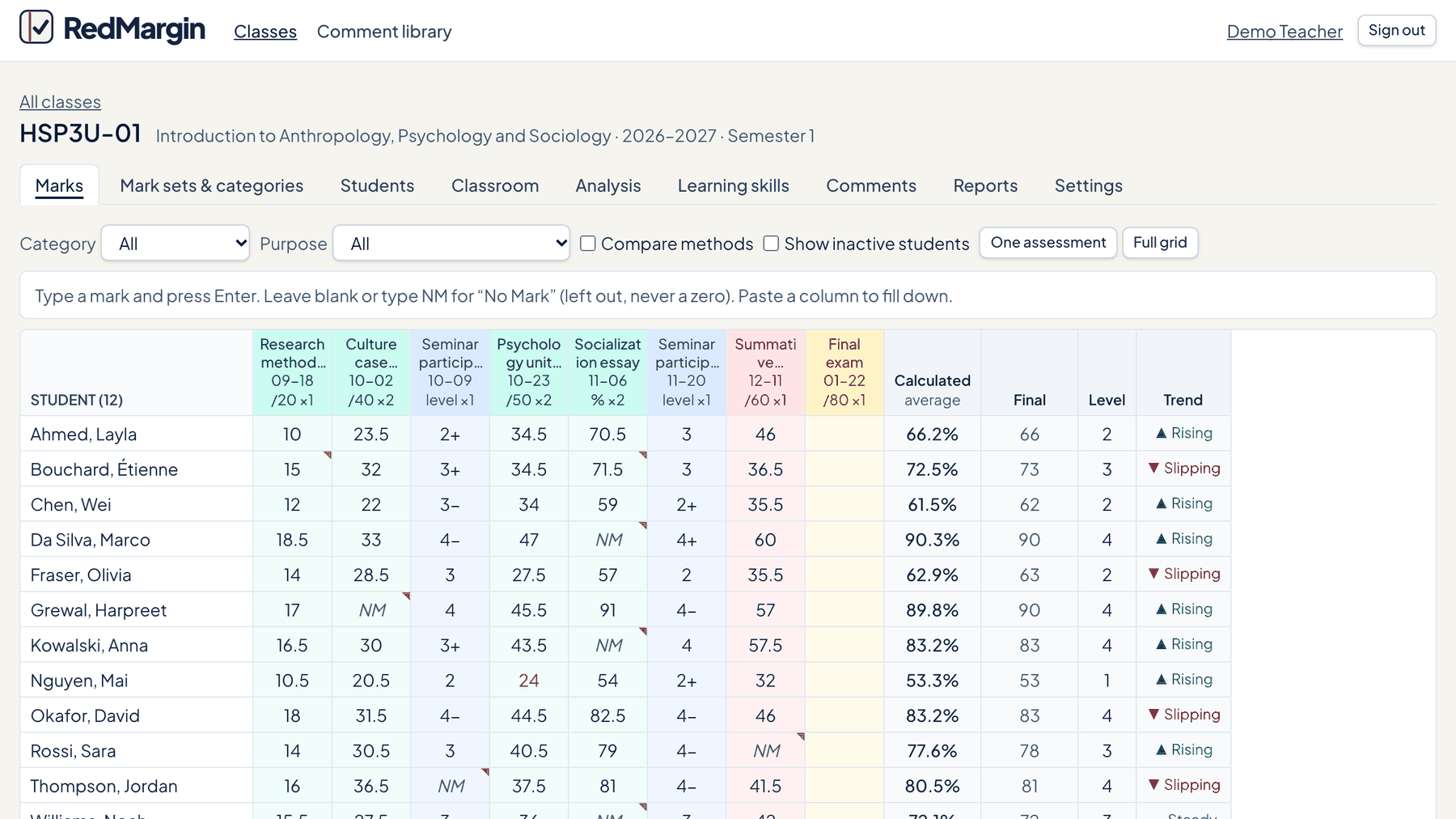
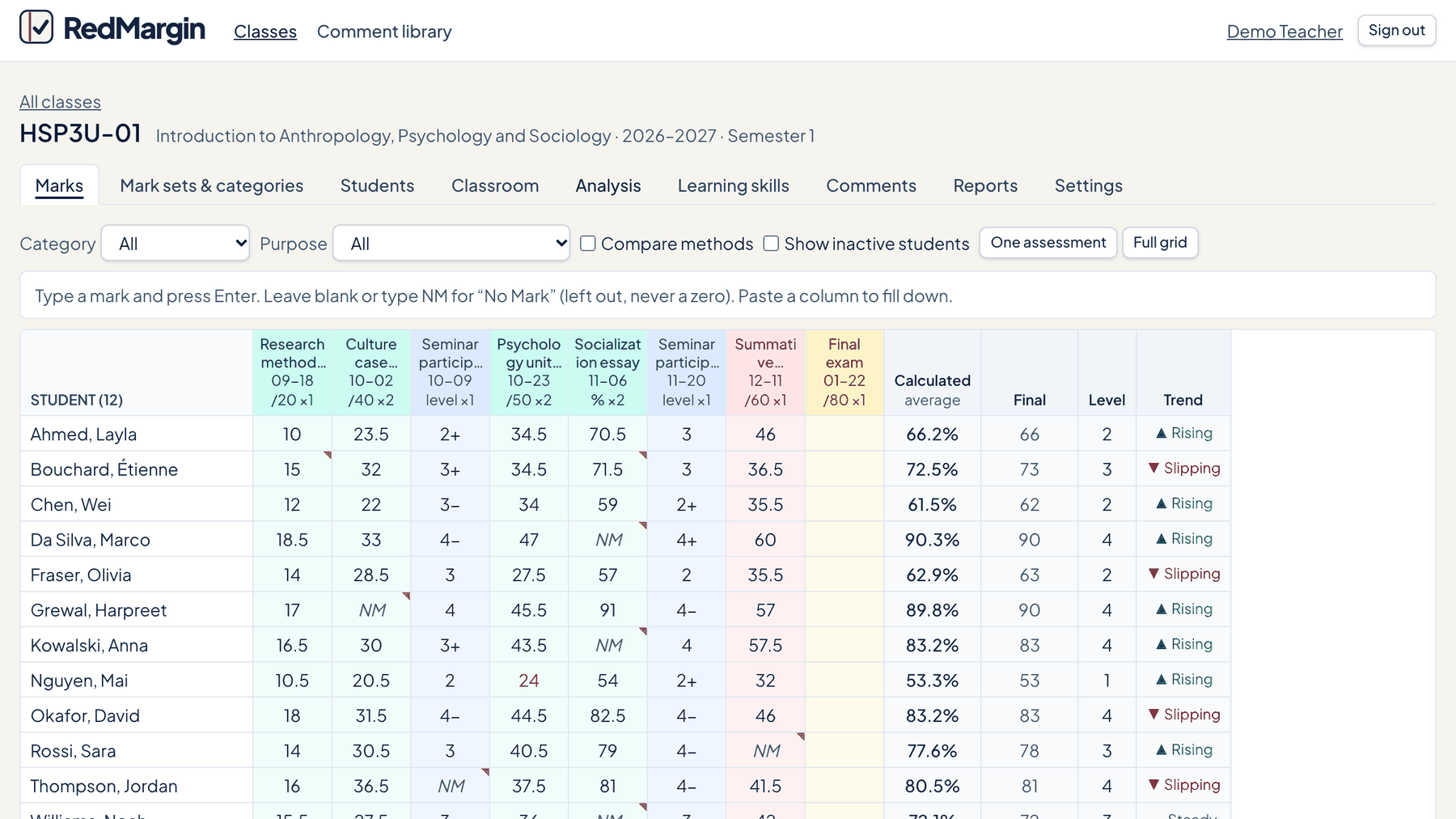
Marks that add up the way you decide
Set up categories and weights for each course. Enter marks from the keyboard, and see every student's grade change as you go.
-
More than one way to grade
A weighted average, the median or the most frequent mark, or mastery of outcomes. Choose per class.
-
Report cards and comments
Keep a bank of comments, write one for each student, rate learning skills, and print clean PDF reports.
-
Attendance and seating
Take attendance in a few taps and lay out your room with a seating plan.
-
Students and families can look
Give each student a private access code. They see their own marks and nothing else. Switch it off whenever you like.
-
Your data goes where you go
Bring in a class list from a CSV file, and download any class as a CSV file at any time.
Built for Canadian classrooms
Tell RedMargin where you teach, and it uses your province's or territory's own words and rules: marks or grades, percentages or proficiency levels, the pass mark, terms and course codes.
- Grades 7 to 12
- Each class keeps its own rules, even if you move
- Checked against WCAG 2.0 Level AA for accessibility
- Works on a phone, a tablet and the computer in your classroom
Provinces and territories
- Alberta
- British Columbia
- Manitoba
- New Brunswick
- Newfoundland and Labrador
- Northwest Territories
- Nova Scotia
- Nunavut
- Ontario
- Prince Edward Island
- Quebec
- Saskatchewan
- Yukon
Student information, handled with care
A gradebook holds information about children. RedMargin is built to hold as little of it as possible, and to keep it in Canada.
- Hosted in Canada
- Only you see your classes
- No advertising, and student information is never sold
- You are signed out when the computer is left unused
- Delete your account and everything in it yourself, at any time
One plan, one price
Everything is included. There is nothing to upgrade to, and no limit on classes or students.
RedMargin for one teacher
$20 CAD a year, plus tax
- Free for your first 6 months
- No card asked for when you sign up
- Never charged automatically
Paying with a voucher
RedMargin does not take cards. You add time to your plan with a voucher code.
- Get a voucher code. Your school may give you one, or you can buy one from us.
- In RedMargin, open Account and type the code under Voucher code.
- The time is added after whatever you already have, so entering it early loses nothing.
Buying for a department or a school? One voucher per teacher, sent to you as a list.
Questions
What happens when my free 6 months end?
You see a reminder, starting 30 days before. Nothing is locked and nothing is deleted. Enter a voucher code under Account to carry on with a paid year.
Do I need my school or board to sign up?
No. Any teacher can create an account. Check your school's or board's rules about where student information may be kept before you enter real names.
Where is the information kept?
On servers in Canada. The privacy notice sets out what is kept, for how long, and who to contact.
Can students and parents see marks?
Only if you turn it on for a class. Each student then gets a private code that shows their own marks. You can replace a code or switch access off at any time.
Can I get my data out?
Yes. Every class downloads as a CSV file, and reports print as PDF. You can also delete your account, which removes every class, student and mark in it.
Does it work in French?
Not yet. RedMargin is in English today. Student names, comments and course names can be written in any language.
What do I need to use it?
A current web browser. There is nothing to install.